Install & Download:
npx ai-elements-vue@latestDescription:
AI Elements Vue is a UI component library that helps you build AI-native applications faster.
It is the official Vue port of Vercel’s AI-Elements and is constructed on top of the popular shadcn-vue library.
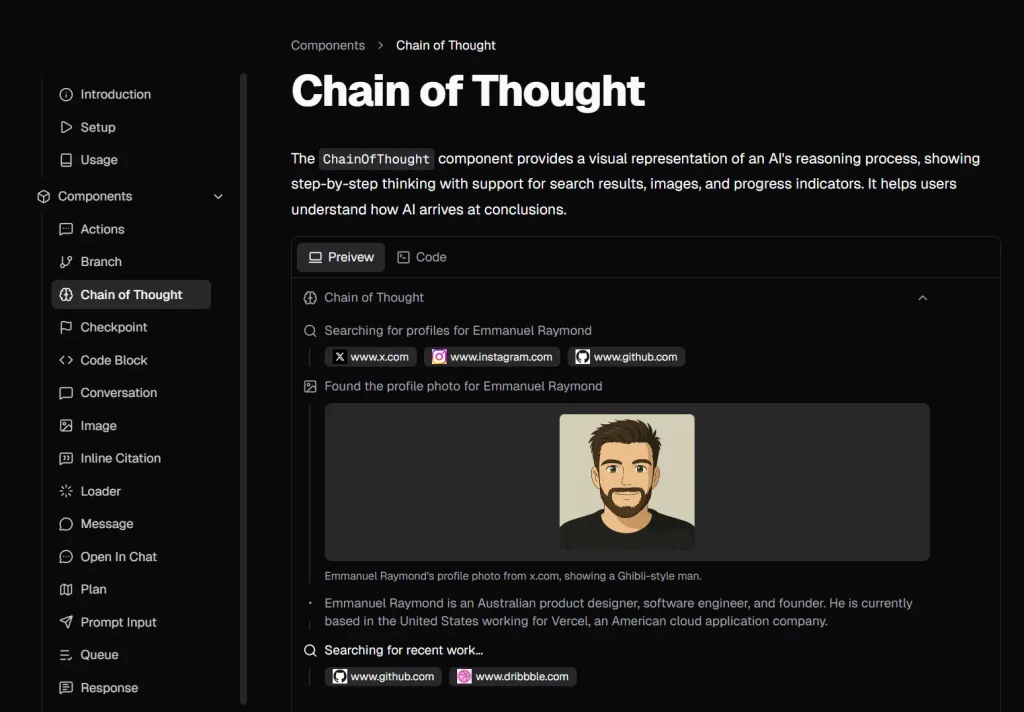
This provides you with a collection of pre-built, customizable Vue components specifically created for AI application interfaces, including elements for conversations, messages, code blocks, and reasoning displays.
Features
- 🤖 AI-Centric Components: Access a curated collection of components for AI UIs, such as conversations, messages, citations, and thought processes.
- 🧩 Full Customization: Components are installed directly into your source code, giving you complete control over their styles, logic, and structure.
- ⚙️ Simple CLI Integration: Use the command-line interface to add all components at once or install them individually as needed.
- 🔄 Automatic Dependency Handling: The CLI automatically detects your package manager and installs all necessary dependencies for the components.
Preview
Use Cases
- AI Chat Applications: Implement complete AI chatbots with message history and user input.
- Code Generation Tools: Display AI-generated code snippets with proper syntax highlighting.
- Research Assistants: Show reasoning processes with collapsible sections and source citations.
- Workflow Management: Visualize task progress and execution plans with interactive elements.
How to Use It
1. Initialize shadcn-vue in your project.
npx shadcn-vue@latest init2. The simplest way to add the library is to install all components at once. This command will detect your project’s configuration, fetch the component registry, and install the components into your designated directory.
npx ai-elements-vue@latest3. To install only specific components, use the add command followed by the component’s name.
# Example: Install only the message component
npx ai-elements-vue@latest add message
4. After installation, the components are available in your project’s components directory, typically @/components/ai-elements/. You can import and use them like any other local component.
5. All available UI components.
- Checkpoint: Marks specific points in a conversation to which a user can revert.
- Code Block: Renders and formats blocks of code within an AI response.
- Conversation: A container for messages that automatically scrolls to the latest entry.
- Image: Displays images within a conversation.
- Inline Citation: Shows inline source citations that reveal details on hover.
- Loader: A loading indicator for asynchronous AI operations.
- Message: The basic component for displaying a single user or AI message.
- Open In Chat: A button or link to expand a topic in a new chat view.
- Plan: Displays AI-generated execution plans with collapsible sections.
- Prompt Input: A text input field for users to submit prompts.
- Queue: A system for displaying lists of messages, tasks, or attachments.
- Response: Renders a Markdown response from a large language model.
- Shimmer: An animated shimmer effect to indicate loading text content.
- Sources: Displays a list of sources or citations used to generate a response.
- Suggestion: A horizontal row of clickable suggestion chips for user prompts.
- Task: A structured component for displaying task lists or workflow progress.
Related Resources
- shadcn-vue: The underlying component collection that AI Elements Vue is built upon. It provides the base components and styling architecture.
- Vercel AI SDK: The TypeScript toolkit required for building AI-powered applications, which integrates with AI Elements Vue.
FAQs
Q: Can I use AI Elements Vue without shadcn-vue?
A: No, AI Elements Vue is built on top of shadcn-vue and requires it to be installed and initialized in your project. The CLI will handle the setup if shadcn-vue is not already present.
Q: Are the components customizable?
A: Yes. The source code is added directly to your project, which allows you to modify them completely to fit your needs.
Q: Does it work with Nuxt.js?
A: Yes, the library is compatible with both standard Vue.js and Nuxt.js projects.
Q: What makes AI Elements Vue different from other component libraries?
A: AI Elements Vue focuses specifically on AI-native application patterns. It provides components like reasoning displays, inline citations, and conversation branching that standard libraries lack.
Q: Which package managers does the CLI support?
A: The CLI automatically detects and works with npm, pnpm, yarn, and bun. It uses your project’s lock file to determine the correct manager.