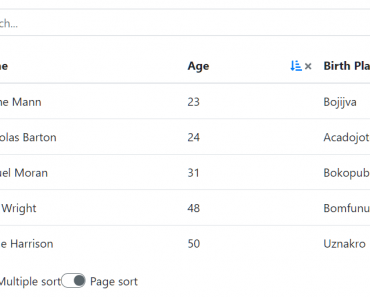
Install & Download:
# Yarn
$ yarn add vue3-datatable
# NPM
$ npm i vue3-datatable
Description:
A feature-rich and highly customizable data table component to manage, display, and interact with large datasets in your Vue projects.
Features:
- Pagination
- Filtering
- Sorting
- Server-side rendering
- Sticky table header
- Row selection
- Custom actions
- And much more…
See Also:
How to use it:
1. Install and import the data table component.
import Vue3Datatable from '@bhplugin/vue3-datatable'
import '@bhplugin/vue3-datatable/dist/style.css'
2. Create a static data table in your app.
<script setup lang="ts">
  import { ref } from 'vue';
  import Vue3Datatable from '@bhplugin/vue3-datatable';
  import '@bhplugin/vue3-datatable/dist/style.css';
  const config = useRuntimeConfig();
  onMounted(() => {
    getUsers();
  });
  const loading: any = ref(true);
  const rows: any = ref(null);
  const cols =
    ref([
        { field: 'id', title: 'ID', isUnique: true },
        { field: 'firstName', title: 'First Name' },
        { field: 'lastName', title: 'Last Name' },
        { field: 'email', title: 'Email' },
        { field: 'age', title: 'Age', type: 'number' },
        { field: 'dob', title: 'Birthdate', type: 'date' },
        { field: 'address.city', title: 'City' },
        { field: 'isActive', title: 'Active', type: 'bool' },
    ]) || [];
  const getUsers = async () => {
    try {
      loading.value = true;
      const response = await fetch('/api/user', {
        method: 'POST',
        body: JSON.stringify({ pagesize: 500 }),
      });
      const data = await response.json();
      rows.value = data?.data;
    } catch {}
    loading.value = false;
  };
</script>
<template>
<div>
<vue3-datatable :rows="rows" :columns="cols" :loading="loading" :sortable="true" :columnFilter="true"> </vue3-datatable>
</div>
</template>3. An advanced example:
import { ref } from 'vue';
import Vue3Datatable from '@bhplugin/vue3-datatable';
import '@bhplugin/vue3-datatable/dist/style.css';
import ApexChart from 'vue3-apexcharts';
const config = useRuntimeConfig();
onMounted(() => {
  getUsers();
});
const loading: any = ref(true);
const total_rows = ref(0);
const params = reactive({
  current_page: 1,
  pagesize: 10,
  sort_column: 'id',
  sort_direction: 'asc',
});
const rows: any = ref(null);
const cols =
  ref([
      { field: 'id', title: 'ID', isUnique: true },
      { field: 'firstName', title: 'User' },
      { field: 'country', title: 'Country', sort: false },
      { field: 'email', title: 'Email' },
      { field: 'age', title: 'Progress', sort: false },
      { field: 'phone', title: 'Phone' },
      { field: 'rating', title: 'Rate', sort: false, minWidth: '120px', headerClass: 'justify-center', cellClass: 'justify-center' },
      { field: 'series', title: 'Progress', sort: false },
      { field: 'status', title: 'Status', sort: false },
  ]) || [];
const getUsers = async () => {
  try {
      loading.value = true;
      const response = await fetch('/api/user', {
          method: 'POST',
          body: JSON.stringify(params),
      });
      const data = await response.json();
      rows.value = data?.data;
      total_rows.value = data?.meta?.total;
  } catch {}
  loading.value = false;
};
const changeServer = (data: any) => {
  params.current_page = data.current_page;
  params.pagesize = data.pagesize;
  params.sort_column = data.sort_column;
  params.sort_direction = data.sort_direction;
  getUsers();
};
const countryList = [
  { code: 'AE', name: 'United Arab Emirates' },
  { code: 'AR', name: 'Argentina' },
  { code: 'AT', name: 'Austria' },
  { code: 'AU', name: 'Australia' },
  { code: 'BE', name: 'Belgium' },
  { code: 'BG', name: 'Bulgaria' },
  { code: 'BN', name: 'Brunei' },
  { code: 'BR', name: 'Brazil' },
  { code: 'BY', name: 'Belarus' },
  { code: 'CA', name: 'Canada' },
  { code: 'CH', name: 'Switzerland' },
  { code: 'CL', name: 'Chile' },
  { code: 'CN', name: 'China' },
  { code: 'CO', name: 'Colombia' },
  { code: 'CZ', name: 'Czech Republic' },
  { code: 'DE', name: 'Germany' },
  { code: 'DK', name: 'Denmark' },
  { code: 'DZ', name: 'Algeria' },
  { code: 'EC', name: 'Ecuador' },
  { code: 'EG', name: 'Egypt' },
  { code: 'ES', name: 'Spain' },
  { code: 'FI', name: 'Finland' },
  { code: 'FR', name: 'France' },
  { code: 'GB', name: 'United Kingdom' },
  { code: 'GR', name: 'Greece' },
  { code: 'HK', name: 'Hong Kong' },
  { code: 'HR', name: 'Croatia' },
  { code: 'HU', name: 'Hungary' },
  { code: 'ID', name: 'Indonesia' },
  { code: 'IE', name: 'Ireland' },
  { code: 'IL', name: 'Israel' },
  { code: 'IN', name: 'India' },
  { code: 'IT', name: 'Italy' },
  { code: 'JO', name: 'Jordan' },
  { code: 'JP', name: 'Japan' },
  { code: 'KE', name: 'Kenya' },
  { code: 'KH', name: 'Cambodia' },
  { code: 'KR', name: 'South Korea' },
  { code: 'KZ', name: 'Kazakhstan' },
  { code: 'LA', name: 'Laos' },
  { code: 'LK', name: 'Sri Lanka' },
  { code: 'MA', name: 'Morocco' },
  { code: 'MM', name: 'Myanmar' },
  { code: 'MO', name: 'Macau' },
  { code: 'MX', name: 'Mexico' },
  { code: 'MY', name: 'Malaysia' },
  { code: 'NG', name: 'Nigeria' },
  { code: 'NL', name: 'Netherlands' },
  { code: 'NO', name: 'Norway' },
  { code: 'NZ', name: 'New Zealand' },
  { code: 'PE', name: 'Peru' },
  { code: 'PH', name: 'Philippines' },
  { code: 'PK', name: 'Pakistan' },
  { code: 'PL', name: 'Poland' },
  { code: 'PT', name: 'Portugal' },
  { code: 'QA', name: 'Qatar' },
  { code: 'RO', name: 'Romania' },
  { code: 'RS', name: 'Serbia' },
  { code: 'RU', name: 'Russia' },
  { code: 'SA', name: 'Saudi Arabia' },
  { code: 'SE', name: 'Sweden' },
  { code: 'SG', name: 'Singapore' },
  { code: 'SK', name: 'Slovakia' },
  { code: 'TH', name: 'Thailand' },
  { code: 'TN', name: 'Tunisia' },
  { code: 'TR', name: 'Turkey' },
  { code: 'TW', name: 'Taiwan' },
  { code: 'UK', name: 'Ukraine' },
  { code: 'UG', name: 'Uganda' },
  { code: 'US', name: 'United States' },
  { code: 'VN', name: 'Vietnam' },
  { code: 'ZA', name: 'South Africa' },
  { code: 'BA', name: 'Bosnia and Herzegovina' },
  { code: 'BD', name: 'Bangladesh' },
  { code: 'EE', name: 'Estonia' },
  { code: 'IQ', name: 'Iraq' },
  { code: 'LU', name: 'Luxembourg' },
  { code: 'LV', name: 'Latvia' },
  { code: 'MK', name: 'North Macedonia' },
  { code: 'SI', name: 'Slovenia' },
  { code: 'PA', name: 'Panama' },
];
const chart_options = computed(() => {
  let option = {
      chart: { sparkline: { enabled: true } },
      stroke: { curve: 'smooth', width: 2 },
      markers: { size: [4, 7], strokeWidth: 0 },
      colors: [randomColor()],
      grid: { padding: { top: 5, bottom: 5 } },
      tooltip: {
          x: { show: false },
          y: {
              title: {
                  formatter: () => {
                      return '';
                  },
              },
          },
      },
  };
  return option;
});
const randomColor = () => {
  const color = ['#5367ff', '#0dcaf0', '#00d09c', '#ff585d', '#ffb61b', '#1da1f2'];
  const random = Math.floor(Math.random() * color.length);
  return color[random];
};
const randomStatusColor = () => {
  const color = ['primary', 'secondary', 'success', 'danger', 'warning', 'info'];
  const random = Math.floor(Math.random() * color.length);
  return color[random];
};
const randomStatus = () => {
  const status = ['PAID', 'APPROVED', 'FAILED', 'CANCEL', 'SUCCESS', 'PENDING', 'COMPLETE'];
  const random = Math.floor(Math.random() * status.length);
  return status[random];
};
const getRandomNumber = (min: number, max: number) => {
  return Math.floor(Math.random() * (max - min + 1)) + min;
};
const getCountry = () => {
  const random = Math.floor(Math.random() * countryList.length);
  return countryList[random];
};
<template>
<div>
<vue3-datatable
:rows="rows"
:columns="cols"
:loading="loading"
:totalRows="total_rows"
:isServerMode="true"
:pageSize="params.pagesize"
:sortable="true"
:sortColumn="params.sort_column"
:sortDirection="params.sort_direction"
class="advanced-table whitespace-nowrap"
@change="changeServer"
>
<template #id="data">
strong class="text-info">#{{ data.value.id }}</strong>
</template>
<template #firstName="data">
<div class="flex items-center gap-2">
<img :src="`/assets/images/profile/profile-${getRandomNumber(1, 32)}.jpeg`" class="w-9 h-9 rounded-full max-w-none" alt="user-profile" />
<div class="font-semibold">{{ data.value.firstName + ' ' + data.value.lastName }}</div>
</div>
</template>
<template #country>
<div class="flex items-center gap-2">
<img width="24" :src="`/assets/images/flags/${getCountry().code}.svg`" class="max-w-none" alt="user profile" />
<div class="text-gray-600">{{ getCountry().name }}</div>
</div>
</template>
<template #email="data">
<a :href="`mailto:${data.value.email}`" class="text-primary hover:underline">{{ data.value.email }}</a>
</template>
<template #age>
<div class="progress-bar">
<div class="progress-line" :style="`width:${getRandomNumber(15, 100)}%; background-color:${randomColor()}`"></div>
</div>
</template>
<template #rating="data">
<div class="flex items-center justify-center text-warning">
<div v-for="i in getRandomNumber(1, 5)" :key="i + data.value.id">
<svg
xmlns="http://www.w3.org/2000/svg"
width="16"
height="16"
viewBox="0 0 24 24"
fill="#e2a03f"
stroke="currentColor"
stroke-width="2"
stroke-linecap="round"
stroke-linejoin="round"
class="feather feather-star f-icon-line">
<polygon points="12 2 15.09 8.26 22 9.27 17 14.14 18.18 21.02 12 17.77 5.82 21.02 7 14.14 2 9.27 8.91 8.26 12 2"></polygon>
</svg>
</div>
</div>
</template>
<template #series="data">
<div style="width: 150px">
<client-only>
<apex-chart :key="data.value.id" height="30" type="line" :options="chart_options" :series="[{ data: [21, 9, 36, 12, 44, 25, 59] }]"></apex-chart>
</client-only>
</div>
</template>
<template #status>
<span class="badge" :class="[randomStatusColor()]">{{ randomStatus() }}</span>
</template>
</vue3-datatable>
</div>
</template>4. Available props.
const props = withDefaults(defineProps<Props>(), {
  loading: false,
  isServerMode: false,
  skin: 'bh-table-striped bh-table-hover',
  totalRows: 0,
  rows: () => [],
  columns: () => [],
  hasCheckbox: false,
  search: '',
  columnChooser: false,
  page: 1,
  pageSize: 10,
  pageSizeOptions: () => [10, 20, 30, 50, 100],
  showPageSize: true,
  rowClass: <never>[],
  cellClass: <never>[],
  cellRenderer: null,
  sortable: false,
  sortColumn: 'id',
  sortDirection: 'asc',
  columnFilter: false,
  pagination: true,
  showNumbers: true,
  showNumbersCount: 5,
  showFirstPage: true,
  showLastPage: true,
  firstArrow: '',
  lastArrow: '',
  nextArrow: '',
  previousArrow: '',
  paginationInfo: 'Showing {0} to {1} of {2} entries',
  noDataContent: 'No data available',
  stickyHeader: false,
  height: '500px',
  stickyFirstColumn: false,
  cloneHeaderInFooter: false,
  selectRowOnClick: false,
});
Preview:

Changelog:
v1.1.3 (11/07/2023)
- fix global search issue on latest vue version