Install & Download:
Description:
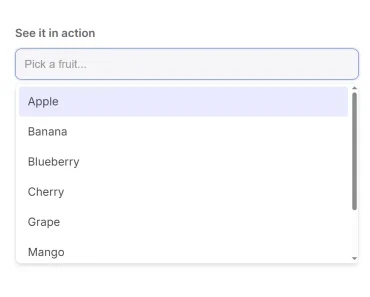
v-super-select is a Vue.js component that creates accessible, dynamic, customizable, mobile-friendly dropdown to replace the native select box.
How to use it:
1. Install and import the v-super-select.
import Vue from "vue";
import VSuperSelect from "v-super-select";
import MyHeader from "./components/Header.vue";
import nearbyIcon from "./assets/nearby-icon.png";
2. Create a basic v-super-select in your template.
export default {
  name: "app",
  data() {
    return {
      loading: true,
  },
  components: {
    VSuperSelect,
    MyHeader
  }
};
3. Default props.
// The label of the dropdown field.
label: String,
// The full unabbreviated label of the dropdown field.
longLabel: String,
// The label of the text input.
name: String,
// For v-model binding to selected value.
value: {
  type: [String, Object],
},
// Show loading spinner when true.
loading: Boolean,
// Data items to display in the drop down.
items: Array,
// Field is disabled.
disabled: {
  type: Boolean,
  default: false,
},
// Placeholder text to display when no value is selected.
placeholder: {
  type: String,
  default: 'Select an Item...',
},
// Value for autocomplete of input tag.
autocomplete: {
  type: String,
  default: 'nope',
},
// Property of the top level item that indicates the name of the group.
groupNameField: {
  type: String,
  default: 'groupName',
},
// Property of the top level item that contains child items of a group.
childrenField: {
  type: String,
  default: 'items',
},
// Property of the item that contains its value.
valueField: {
  type: String,
  default: 'value',
},
// Property of the item that contains its text to display.
textField: {
  type: String,
  default: 'text',
},
// Property of the item that contains the icon url.
iconUrlField: {
  type: String,
  default: 'iconUrl',
},
// Property of the item that contains the icon class.
iconClassField: {
  type: String,
  default: 'iconClass',
},
// Indicates if the value of each item should be shown on the right side of the item.
showValue: {
  type: Boolean,
  default: true,
},
// Text to display when no items are found.
noneFoundText: {
  type: String,
  default: 'No Results Found',
},
// Css height of the textbox container.
inputHeight: {
  type: String,
  default: '52px',
},
// Css width of the textbox container.
inputWidth: {
  type: String,
  default: '185px',
},
// Height in pixels of each individual item.
itemHeight: {
  type: Number,
  default: 40,
},
// Css max height of dropdown.
dropDownMaxHeight: {
  type: [Number, String],
},
// Amount of time to wait after user input before filtering is performed.
debounceTime: {
  type: Number,
  default: 250,
},
// Additional item properties to inspect when searching
searchFields: {
  type: [String, Array],
  default: () => [],
},
// Allows enabling browser spellcheck on input field.
spellcheck: Boolean,
// Background color for full-style mobile header.
mobileHeaderBackgroundColor: {
  type: String,
  default: '#2e3a30',
},
// Bottom border color styling for full-style mobile header.
mobileHeaderBorderBottom: {
  type: String,
  default: 'linear-gradient(to right, #2e3a30, #ccc)',
},
// If true, mobile devices will use native select.
nativeMobile: {
  type: Boolean,
  default: false,
},
Preview: